Windows 10 end-of-support has compressed the timeline
Migration programmes that used to have three years now have months. Packaging work that was scheduled across multiple waves now lands on a single wave with little slack.

Solution
Forge captures applications directly from running systems, converts MSI and App-V to MSIX, handles signing and manifest fix-ups, and produces Intune-ready and AppAttach-ready packages. Built for MSPs, migration partners, and internal IT moving off Windows 10 and legacy deployment formats.
Oct 2025
Windows 10 end-of-support, migration window is months, not years
4 formats
MSIX, MSI, IntuneWin, AppAttach from one capture
Installer-less
capture-first workflow when the original media is lost
The problem
MSIX is the modern Microsoft deployment format, but the path from a legacy Windows application to a signed, deployed MSIX is narrow. Teams run into four blockers: installer media that has been lost for years, in-house MSIX skills that are scarce and expensive, manifest and signing pitfalls that do not surface until deployment, and diverse targets that seem to need different packaging runs. Intune uses MSIX or IntuneWin, Azure Virtual Desktop uses AppAttach, and Windows 365 uses MSIX or IntuneWin (Windows 365 does not currently support AppAttach).
Migration programmes that used to have three years now have months. Packaging work that was scheduled across multiple waves now lands on a single wave with little slack.
Experienced packagers are rare and in demand. Training a team from scratch extends timelines past the Windows 10 end-of-support cliff, which is why AI-guided routes and capture-first workflows matter.
Legacy applications often have no installer, no documentation, and undocumented dependencies. Any MSIX workflow that depends on clean installer media does not survive contact with a real legacy estate.
Signing, manifest fix-ups, and modification packages are MSIX-specific problems that teams do not hit until late in the process. A pipeline that handles them inline is materially faster than one that punts to external signing tools.
What changes
One capture produces signed MSIX for Intune, IntuneWin for legacy-path Intune deployment, MSIX AppAttach for Azure Virtual Desktop, and MSI for legacy targets. Windows 365 delivery uses MSIX or IntuneWin output.
Signing, manifest fix-ups, and modification packages are handled inside the workflow with customer-managed or Microsoft-trusted certificate chains, so no separate signing toolchain is required.
AI-guided routing picks MSI, MSIX, AppAttach, or IntuneWin per application and suggests dependency resolution and compatibility fixes, so packaging teams without deep MSIX skills keep moving.
Fewer packages stuck in manual rework at the end of the migration wave, with one capture covering multiple modern delivery targets rather than running separate pipelines per output.
The packaging view
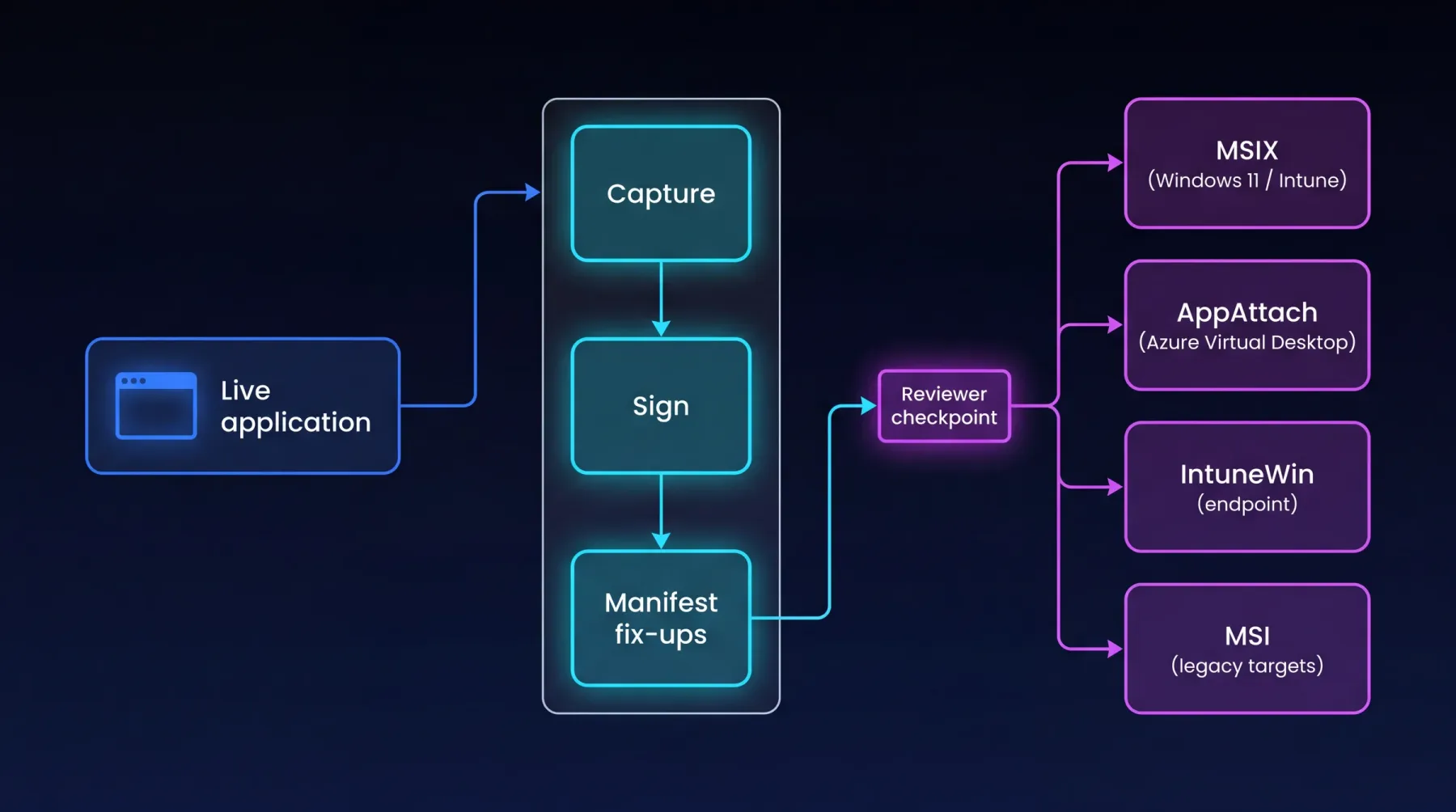
Capture, sign, and apply manifest fix-ups inside EtherApps Forge, then route through a reviewer checkpoint into MSIX for Windows 11 and Intune, AppAttach for Azure Virtual Desktop, IntuneWin for endpoint deployment, or MSI for legacy targets - all from the same capture.
How we deliver it
This route is led by EtherApps Forge for capture-first MSIX, MSI, IntuneWin, and AppAttach outputs with signing and AI-guided routing handled inline. Windows 365 does not currently support AppAttach, so Cloud PC delivery uses MSIX or IntuneWin. Bring in EtherInsights where the programme also needs Windows 365 cohort design, licensing planning, or migration baselines from Azure Virtual Desktop or legacy VDI alongside the packaging workstream.
EtherApps Forge captures installed Windows applications from running systems, analyses the real application footprint, supports AI-guided packaging decisions, and produces deployment-ready outputs for modern environments.
EtherInsights started as the cost management platform for Microsoft 365 and Azure. It shows where spend is going, which owners need to act, and how to turn waste into savings. It now extends that operating view into full Windows 365 lifecycle support, plus tenant, user, security, device, and Intune reporting.
Where this fits
FAQ
Keep the evaluation grounded in installer-less capture, signing, target-format routing, and how Forge sits alongside existing packaging teams.
Windows 10 support ends October 2025, Intune defaults to modern deployment paths, and Azure Virtual Desktop AppAttach requires MSIX. The migration window has compressed from years into months for most teams, and MSIX is the format that lands across Intune, AVD AppAttach, and modern Cloud PC delivery alongside IntuneWin.
Yes. Capture-first means no installer media dependency. Forge captures the installed application footprint from a live system (files, registry, AppData, services, and dependencies) and produces signed MSIX, MSI, IntuneWin, and AppAttach outputs from one capture. This is the main reason teams pick Forge over traditional packaging toolchains for legacy estates.
Yes. One capture produces signed MSIX for Intune, IntuneWin for legacy-path Intune deployment, and MSIX AppAttach for Azure Virtual Desktop. Windows 365 delivery uses MSIX or IntuneWin from the same capture. Windows 365 does not currently support AppAttach, so Cloud PC delivery goes via the MSIX or IntuneWin path.
No. AI-guided routing augments the team by closing the MSIX skills gap and suggesting the right path per application, but a human reviewer still signs off on each package. Forge works alongside existing packaging workflows rather than replacing packager judgement.
Start here
Start with a 7-day Forge trial on a real application, or book a demo to walk through capture-first MSIX, signing, and AppAttach routing before Windows 10 end-of-support compresses the timeline further.