Intune reports sit in separate panes
Device compliance, patch status, Defender posture, app protection, encryption, and Autopilot reporting each live behind their own views, so no single report shows the full estate picture.

Solution
Bring the full Intune report catalogue, tenant configuration backup, drift detection, policy explorer, and per-device deep dive into one operating view. AI-generated dashboard insights turn raw device, compliance, and patch state into owner-led next actions for IT operations teams and MSPs.
~30
Intune reports consolidated into one operating view
Per-device
side-blade with CVE lookup against installed apps
Pinned baseline
drift detection with per-object restore on change

The problem
Intune surfaces device state through separate reports, and tenant configuration drift, failing compliance, patch gaps, Windows 11 readiness blockers, and BitLocker or Defender issues are often discovered one device at a time. Teams rebuild the same evidence for every review, every audit, and every escalation.
Device compliance, patch status, Defender posture, app protection, encryption, and Autopilot reporting each live behind their own views, so no single report shows the full estate picture.
QBR slides, audit packs, and escalation reviews are rebuilt from exports each time, because configuration baselines, drift history, and device-level state are not kept in one operating record.
Compliance failures, BitLocker gaps, TPM issues, certificate expiry, and Windows 11 readiness blockers are chased device by device rather than solved at cohort level with shared boot-cause evidence.
What changes
Bring around thirty Intune reports, tenant configuration backup, drift analysis, policy explorer, and device deep-dive into one operating view shared by IT operations, security, and service owners.
Open any device and see compliance, patches, Defender, encryption, TPM, certificates, config profiles, managed apps, Windows 11 readiness, and CVE lookup against installed applications, with boot-cause analysis for compliance failures. Device troubleshooting moves from one-at-a-time to cohort-level shared evidence.
Produce review-ready reporting on compliance, patch posture, Windows 11 readiness, Defender state, CVE exposure, and configuration drift without rebuilding the evidence each cycle.
Use AI-generated dashboard insights, boot-cause analysis, and exportable reports to turn raw device state into prioritised next actions with named owners.
The device view
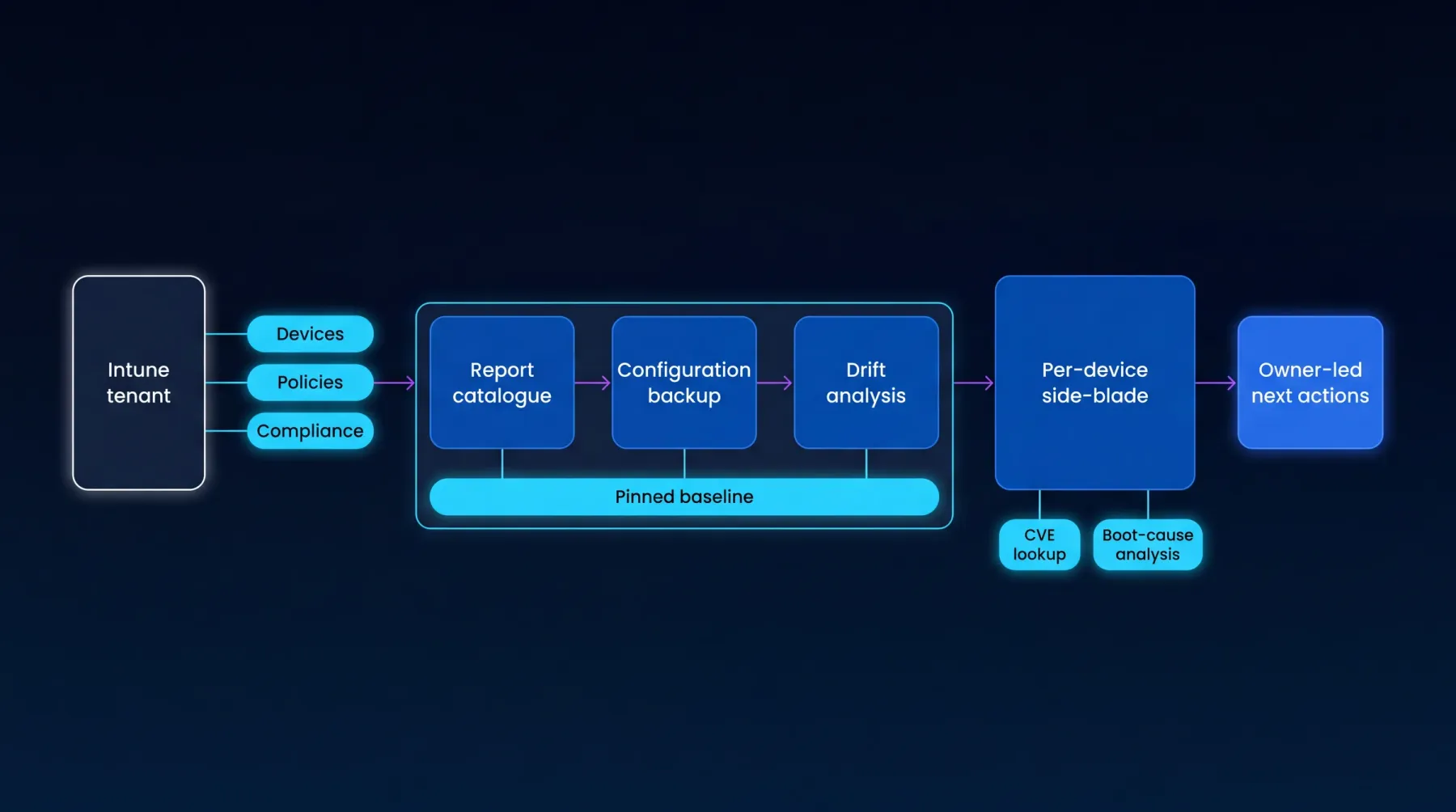
Intune tenant (devices, policies, compliance) feeds a report catalogue, configuration backup, and drift analysis - all tracked against a pinned baseline - and a per-device side-blade with CVE lookup and boot-cause analysis, producing owner-led next actions.
Video walkthrough
A focused walkthrough of Intune reporting, device risk, readiness, and endpoint evidence in EtherInsights.
Configuration clip
Use this focused clip when the team is evaluating pinned baselines, drift detection, and recovery evidence.
See configuration backup, pinned baselines, drift detection, and recovery evidence for Microsoft 365.
How we deliver it
This route is led by EtherInsights for the Intune report catalogue, tenant configuration backup and drift analysis, policy explorer across Conditional Access, Named Locations, Authentication Strengths, and Security Defaults, per-device deep-dive with boot-cause analysis, and AI insights across dashboards. Bring in EtherAssist where operational follow-through needs workflow support, scripted remediation, or send-to-Comms integration.
EtherInsights started as the cost management platform for Microsoft 365 and Azure. It shows where spend is going, which owners need to act, and how to turn waste into savings. It now extends that operating view into full Windows 365 lifecycle support, plus tenant, user, security, device, and Intune reporting.
EtherAssist gives IT and compliance teams the speed of AI without giving up data control, auditability, or practical governance. It supports troubleshooting, scripting, documentation, policy work, and repeatable internal support workflows.
Where this fits
Start here
Start with a focused walkthrough of Intune reporting, configuration backup, drift detection, and device troubleshooting, or jump into a 14-day trial for hands-on evaluation.