Admin surfaces are fragmented
Entra, Intune, Defender, Purview, and the Microsoft 365 admin centre each hold part of the posture picture, so no single pane shows how the tenant stands against published baselines.

Solution
Run a repeatable Microsoft 365 tenant security assessment, pin overlay baselines, and keep Secure Score, Copilot readiness, Zero Trust coverage, and drift visible between reviews. Built for IT leaders, Microsoft admins, security leads, and MSPs who need conformity evidence without rebuilding it each audit cycle.
4 frameworks
Microsoft Security Baselines, CISA SCuBA, NSA CISS, Zero Trust
Drift-tracked
between assessments, not rebuilt each audit cycle
One pack
of conformity evidence for governance, audit, and MSP customer reviews

The problem
Secure Score, Copilot readiness, Zero Trust pillar coverage, and overlay conformity against Microsoft Security Baselines, CISA SCuBA, and NSA CISS are spread across separate admin centres, exports, and spreadsheets. Users and groups, risky identities, and offboarding work sit in another pane again. Teams struggle to prove conformity, and drift between assessment and remediation is rarely visible before an audit, an incident, or a customer review.
Entra, Intune, Defender, Purview, and the Microsoft 365 admin centre each hold part of the posture picture, so no single pane shows how the tenant stands against published baselines.
Teams rebuild the same baseline mappings, Secure Score exports, and Zero Trust scoring in spreadsheets every review, so evidence is slow to produce and hard to trust.
Security teams report against frameworks while operations teams act on tickets, so remediation decisions drift away from the same baseline both sides are meant to share.
What changes
Run a repeatable Microsoft 365 tenant assessment against Microsoft Security Baselines, CISA SCuBA, NSA CISS, and product-level overlays for Edge, Microsoft 365 Apps, Windows 11, Windows 10, and Windows 365.
Score Zero Trust pillars, track Secure Score over time, and check Copilot readiness before rollout so posture work happens before deployment, not after.
Turn assessment findings, overlay gaps, and risky identities into named actions with evidence that holds up in governance reviews, audits, and MSP customer reports.
The conformity view
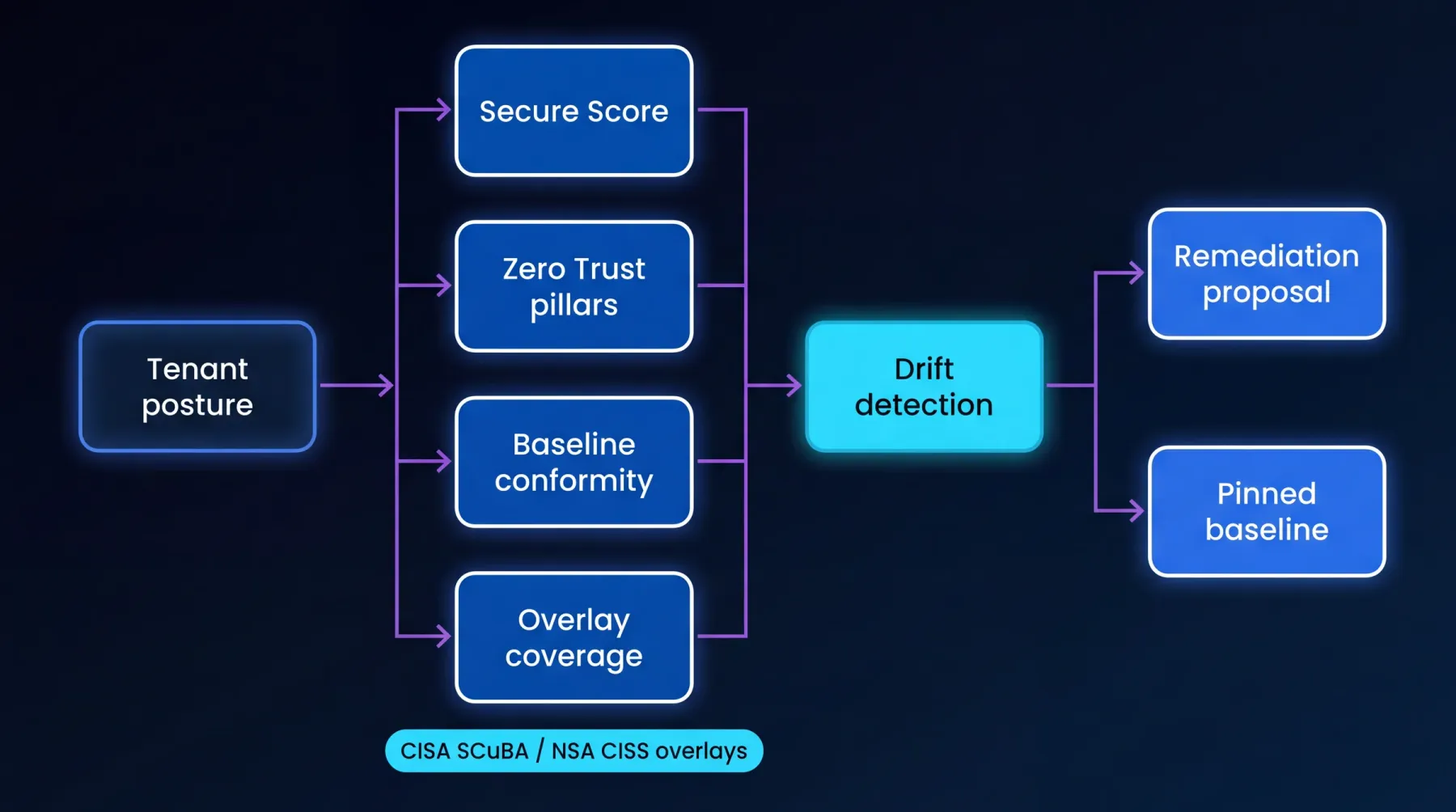
Tenant posture scored across Secure Score, Zero Trust pillars, baseline conformity, and overlay coverage (CISA SCuBA / NSA CISS), flowing into drift detection and on to a remediation proposal and pinned baseline.
Video walkthrough
A focused walkthrough of Microsoft cloud security posture, conformity evidence, and readiness signals in EtherInsights.
How we deliver it
This route is led by EtherInsights for tenant assessment, overlay catalogue coverage, Secure Score and Copilot readiness tracking, Zero Trust pillar scoring, users and groups management, risky identities, offboarding control, and drift detection against the pinned baseline. The same evidence supports governance reporting, MSP customer conversations, and remediation planning.
EtherInsights started as the cost management platform for Microsoft 365 and Azure. It shows where spend is going, which owners need to act, and how to turn waste into savings. It now extends that operating view into full Windows 365 lifecycle support, plus tenant, user, security, device, and Intune reporting.
Where this fits
Start here
Start with a focused Microsoft 365 security assessment, pin the overlay baselines that matter, and keep Secure Score, Zero Trust coverage, and drift visible between reviews.