Installer media is missing or incomplete
Legacy applications often survive long after the clean installer is gone, which means packaging work starts with uncertainty instead of a clear route.

Solution
Capture what is already running, reduce packaging unknowns, and create practical routes into modern deployment workflows without defaulting to rebuild-first projects.
Capture-first
workflow when installer media is missing or incomplete
Portfolio-wide
migration readiness across the legacy application estate
4 outputs
MSIX, MSI, IntuneWin, AppAttach from one capture
The problem
Legacy applications become migration blockers when installer media is missing, packaging routes are unclear, or teams cannot see the real application footprint early enough in the programme.
Legacy applications often survive long after the clean installer is gone, which means packaging work starts with uncertainty instead of a clear route.
If teams cannot see files, services, registry changes, or AppData dependencies clearly, route decisions become slower and riskier.
MSIX, Intune, and App Attach may be the destination, but the real blocker is choosing and delivering the route from the live application footprint.
What changes
Reduce migration delays caused by missing installer media, packaging backlog, and conversion complexity.
Increase confidence in wave planning by reducing unknowns in application preparation earlier.
Give endpoint and release teams clearer packaging throughput and dependency control.
The modernisation view
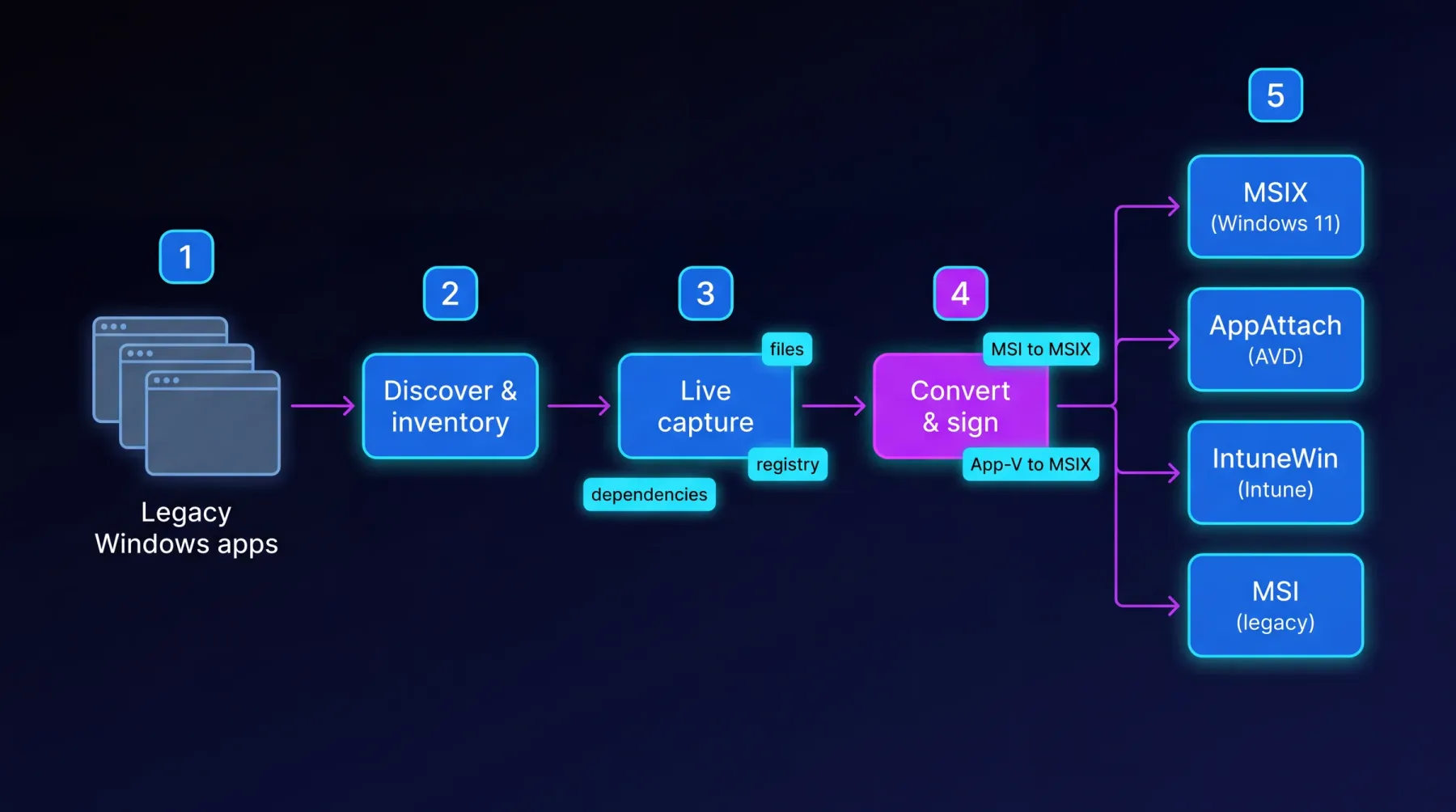
Discover and inventory the legacy estate, capture each application from a live system (files, registry, dependencies), convert and sign through EtherApps Forge, and route into modern delivery: MSIX for Windows 11, AppAttach for AVD, IntuneWin for Intune, or MSI for legacy targets.
How we deliver it
This route is led by EtherApps Forge as the capture-first route into modern packaging and deployment-ready outputs, with optional support from other portfolio components where wider planning context is needed.
EtherApps Forge captures installed Windows applications from running systems, analyses the real application footprint, supports AI-guided packaging decisions, and produces deployment-ready outputs for modern environments.
Start here
Use a delivery-focused session to map packaging priorities, route decisions, and rollout dependencies.